 Premium↗
← MarketplacePremium↗  Premium↗
 ▶
 Nuts✓ Verified buyer
Scripts / Extensions
Counter
Premium$8.00 $4.99 −38%🔥 Ends in7d00h36m--s
- Tags
- WorkflowAutomation
- Compatibility
- VEGAS Pro 27, 26, 23, 22, 21, 20, 19, 18, 17, 16, 15, 14
- License keys
- 🔑 License key included (1 computer(s))
- Version
- v1.1 · updated 11/14/2026
Description
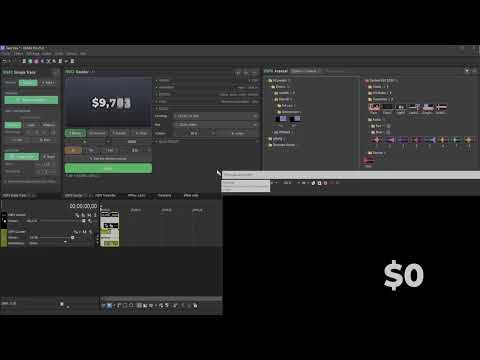
Animated money counters, numbers, percentages and timers for VEGAS Pro — in one click.
$0 → $10,000 in 3 seconds, 0 → 100%, 1M views, a 10-second countdown, a 1-hour stopwatch: type the start and end values, pick a duration, click Apply. The counter lands on your timeline at the cursor, ready to use, with its sound.
WHAT IT DOES
- 4 modes: Money, Number, Percent, Timer
- Type values the way you think: 10000, 10 000, 10k, 1.5M, $1,250,000, 1:30, 1:00:00
- Durations in one click (1s to 10s) or any custom length up to 1 hour; timers can run in real time
- Formats: $ € £ or any prefix/suffix, 1,000 / 1 000 / 1.000 separators, decimals, K / M / B abbreviations, timer formats m:ss, mm:ss, h:mm:ss, ss.cc, mm:ss.cc
ANIMATION
- Linear, ease in, ease out, in-out, expo (the classic money counter)
- Custom curve: drag 2 handles, like a speed graph
- Elastic: overshoots, bounces and settles — set its height (Amp) and speed (Per) right in the graph
- Hold the final value as long as you want
STYLE
- Any font installed on your PC, each one shown in its own style in the list
- Fill, outline, shadow, size, alignment, top / center / bottom
- Fixed-width digits: the counter never shakes while it counts
- Rendered at the real pixel size of your project, on a transparent background: sharp text, no quality loss
SOUND
- 14 counting sounds (tick, coin, slot machine, arcade, typewriter, clock…) and 6 end sounds (bell, ka-ching, success, impact…)
- Sounds follow the digits on screen and slow down when the counter eases out
- Density and volume, listen before creating
- Placed on an audio track and grouped with the counter
FAST
- Live preview of your project frame: hover any option to see it before clicking
- Large preview window
- Quick presets: one click creates the counter at the cursor; save your own
- Keyboard shortcut "VISFX Counter · Create counter" (Options > Customize Keyboard)
- An identical counter reuses its previous render instantly; one click cleans old renders
- Ctrl+Z undoes it like any VEGAS action
DESIGNED FOR VEGAS
- Dockable panel that takes VEGAS's own colors
- 10 languages: English, Français, Español, Deutsch, Português, Italiano, Русский, 中文, 日本語, 한국어
- One-click updates from the panel when a new version is out
- Optional anonymous error reports so bugs get fixed fast; report a bug from ⋯ > Help
REQUIREMENTS
- VEGAS Pro 14 or later, Windows 10 / 11
- Install: extract the zip, double-click Install.cmd, then View > Extensions > VISFX Counter in VEGAS
FREE TRIAL
Try every feature free for 2 days, then one payment, yours for life.
What's new in v1.1
VISFX Counter 1.1
NEW EFFECTS
- Rolling digits: every digit rolls like an odometer, with adjustable roll speed, direction and motion blur
- Tick pulse: the number pops on every counting sound, with strength, length and shake settings
- Progress bar or ring that fills as the counter runs (color and thickness)
- Color by value: start → end color (or fade into your text's own color / gradient), or a color when a threshold is reached
- Confetti when the counter lands: above the number, from the sides, all three, or full-screen rain (amount, size, force)
SPAWN / DESPAWN
- 11 modern letter-by-letter animations (Bubble, Caption, Bounce, Jelly, Twirl, Squish, Stretch, Slam, Swipe, Spin, Drift)
- Live preview box: hover an animation to see it before applying
- Use your own animations made in VISFX ProTitles
STYLE
- Shadow color, opacity, distance, angle and softness
- Vertical gradient, letter spacing, width and slant
- "+" sign for positive values, negatives in red
SOUND
- Tighter sync: a tick on every visible change, end sounds heard instantly
- Add your own WAV sounds (drag & drop), the preview now plays with sound
WORKFLOW
- Edit a counter already on the timeline and update it in place
- Undo / redo (Ctrl+Z / Ctrl+Y)
- New quick presets, 3 quick durations (3 s, 10 s, 1 min)
- Long counters render much faster (far fewer images)
- Resizable / maximizable big preview, tidier panel, many fixes
Also available in these bundles
📦 Content Editor PackPrivate seller: consumer protection law does not apply to purchases from private individuals.
Third-party community product. Not an official VEGAS Creative Software product.
⚑ Report this contentYou might also like
You’ll probably like these too
Resources with the same tags or in the same category, to compare and find the one that suits you best.
Premium↗Premium↗


COMMUNITY
Made with this tool
Edits shared by people who use it.
▶0 to 1000$ Animationby nat.veg · 11/14/2026
REVIEWS
Buyer reviews 5.0 (1)
Only people who bought or downloaded this resource can review it.
INSANE Price to value ratio 🚀💯🔥
QUESTIONS
Questions & answers
Ask the creator before you buy. Questions and answers are public.
Log in — sign in to ask a question.
No questions yet.